
Beyond Confident Answers: Building a Trustworthy AI Agent
Constructing a trustworthy AI agent experience with confidence labels, source transparency, and actionable feedback.
An AI agent can sound confident even when its evidence is incomplete. For users, the real challenge is not getting an instant answer, but knowing when to trust it, how to verify its sources, and what to do when something feels wrong.
This challenge led our team at OFNAV to explore the user experience of Juristify AI, a legal AI agent. We focused on moments that shape confidence: unclear answers, limited source transparency, and ways for users to question or correct AI-generated answers.
Team OFNAV investigated friction points and redesigned the experience around transparency, user control, and feedback. We introduced clearer confidence cues, accessible source references, and ways to flag and review errors.
This is the story of how we approached the UX problem: How might we help users move beyond confident AI answers toward evidence-based decisions? Let's start with the problem.
Logo Formation
The Juristify AI logo combines connected-node symbol with clean wordmark to represent AI and connected knowledge.
The symbol represents intelligence and connection, while the simple black and white design creates clear, modern identity across Juristify AI experience.
This study explores logo symbol and applications across light and dark backgrounds, highlighting consistent identity across digital touchpoints.

The Problem: Confident Answers Without Clear Evidence
The core UX challenge was helping users judge AI reliability. Fluent answers sounded convincing, but unclear evidence and weak trust signals made verification difficult.
Users needed more than quick answers. They needed transparency, clear evidence, and the confidence to move forward.

Without clear confidence signals and transparent evidence, users may accept an answer too quickly or interrupt their task to verify everything elsewhere.
What We Found: Users Need Clarity, Not Just Confident Answers
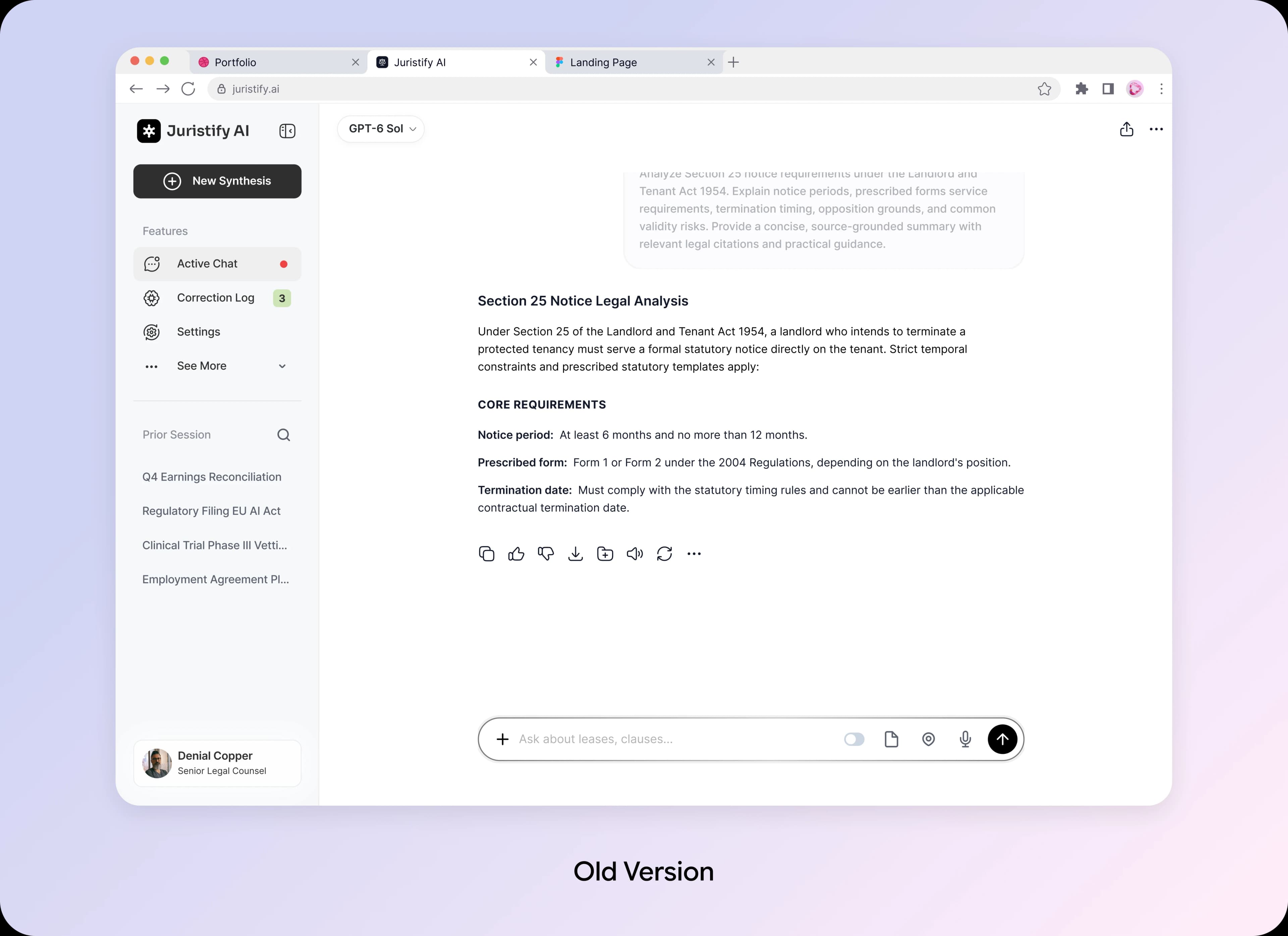
The old experience focused on delivering AI answers but did not do enough to help users understand, verify, or act on them. Without clear guidance and supporting evidence, users were left uncertain about what to trust and what to do next.
No Proactive AI Guidance
The agent delivered answers but offered little guidance when users needed help to confirm them.
Unclear Next Steps
Users had no clear direction on how to verify an answer or move forward with confidence.
Limited Evidence Transparency
Answers could sound convincing without making their supporting sources easy to find and evaluate.
No Clear Path to Correct Errors
When answers seemed wrong or confusing, users lacked an obvious way to flag issues and review corrections.
Now, Look at It From the User's Side
Uncertainty: Can I really trust this answer?
Confusion: How do I verify what the AI is telling me?
Lack of control: What if the answer is wrong?
Loss of confidence: I'm not sure I should continue.

Information Architecture
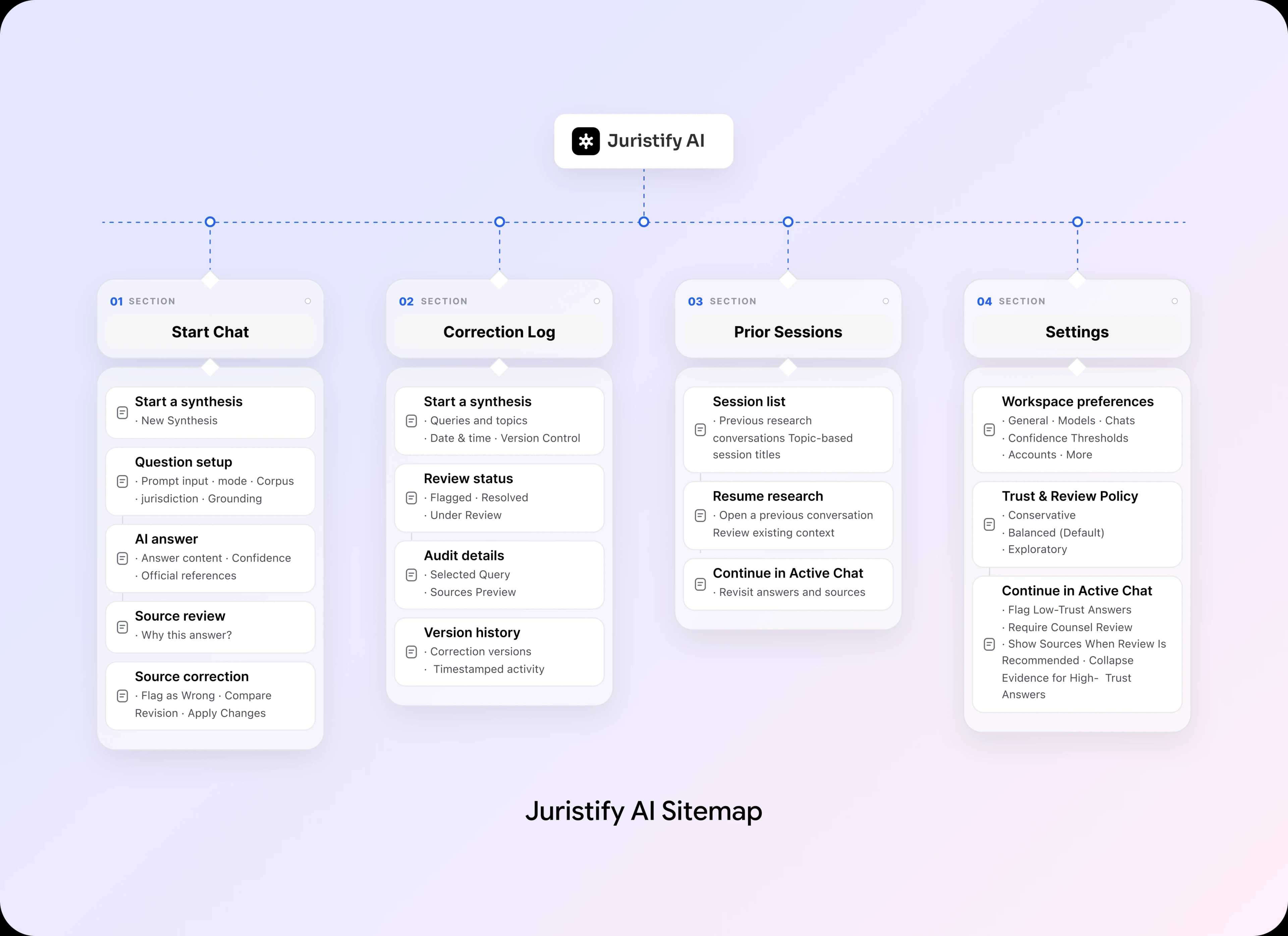
Before designing individual screens, we mapped the entire user journey to create a clear path from AI answers to trusted decisions. Every page had a purpose: help users navigate the experience, verify information, and move forward with confidence.
A Small Design System Built for Trust and Clarity
Juristify's trust layer uses consistent typography, clear contrast, and purposeful status colors so users can read AI answers first, then review confidence, sources, and corrections only when needed.

Five Trust Steps, One Clear AI Experience
We redesigned the Juristify AI experience to address five key UX challenges across the user journey. Each solution focuses on making AI interactions clearer, more transparent, and easier to control.
Problem: Users Struggled to Ask Questions
Users needed a simple way to ask legal questions without navigating complex tools or workflows.
Solution: Simplified Question Input
We designed a familiar chat interface that allows users to ask questions naturally and start conversations with minimal effort.
Problem: Users Couldn't Judge AI Reliability
AI responses sounded confident, but users couldn't easily determine how well the answers were supported.
Solution: Visible Confidence Levels
We introduced confidence labels that help users understand the level of support behind each AI-generated response.
Problem: Supporting Evidence Was Hard to Verify
Users lacked an easy way to inspect the sources behind AI answers, making verification difficult.
Solution: Transparent Source Panel
We designed an optional source panel that makes supporting references accessible without interrupting the conversation.
Problem: Users Had Limited Control Over Errors
When AI responses seemed incorrect, users needed a clear way to report inaccuracies.
Solution: One-Tap Error Reporting
We introduced a simple Flag as Wrong action, allowing users to report questionable answers directly.
Problem: Users Couldn't Track Corrections
After reporting an issue, users had limited visibility into whether it had been reviewed or corrected.
Solution: Transparent Correction History
We designed a correction log that helps users track reported issues, review updates, and understand what changed.
The Trust Journey: From AI Answer to Informed Decision
We mapped the entire user journey to make every interaction purposeful, guiding users from AI-generated answers to verified information and more informed decisions.
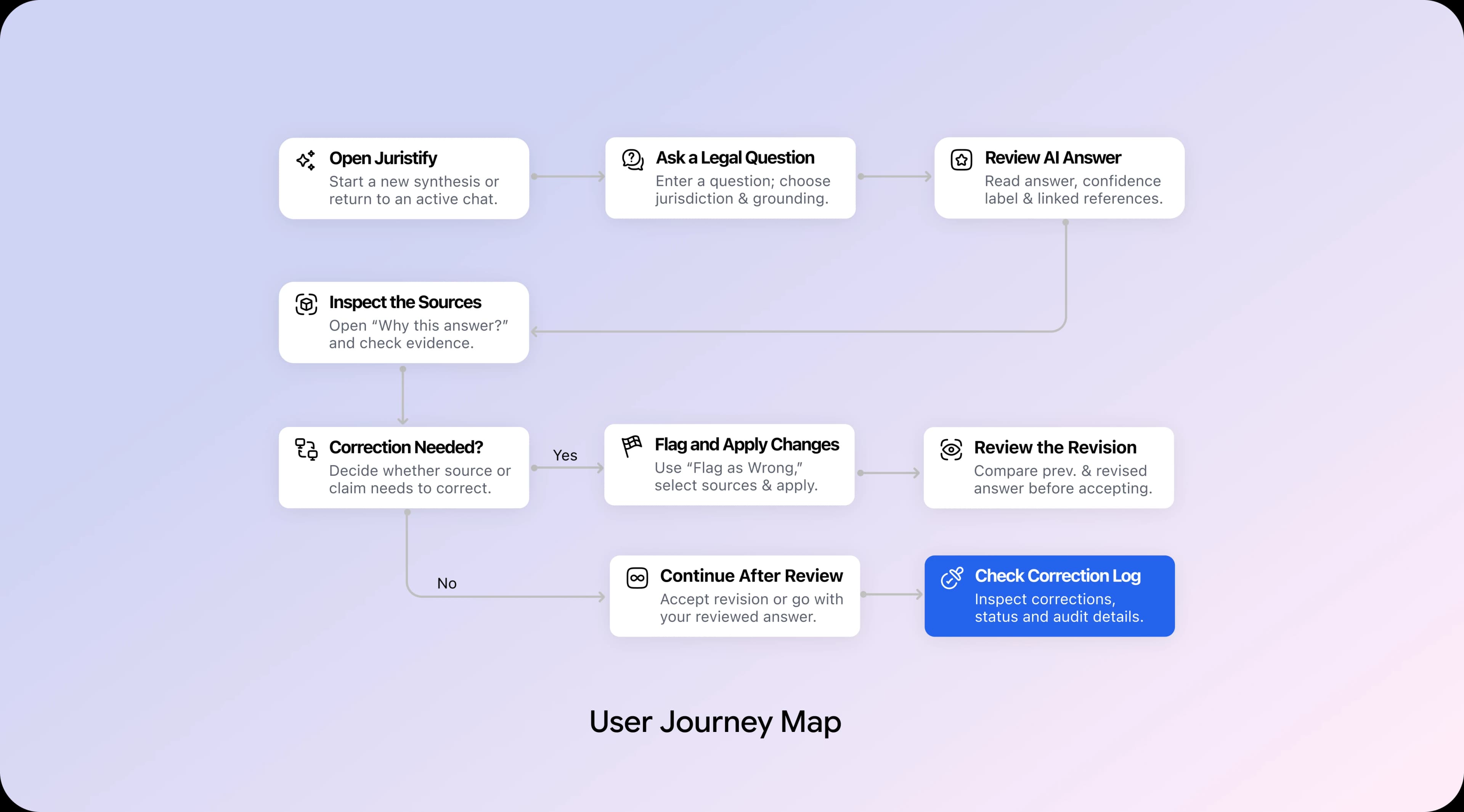
From Early Exploration to High-Fidelity Trust Screens
We worked in two stages: first refining the structure and user flow, then transforming the concepts into high-fidelity screens.
Low-Fidelity Wireframes
The low-fidelity wireframes focused on function over appearance. We defined the page structure, information hierarchy, and layout to ensure users could navigate the experience clearly.
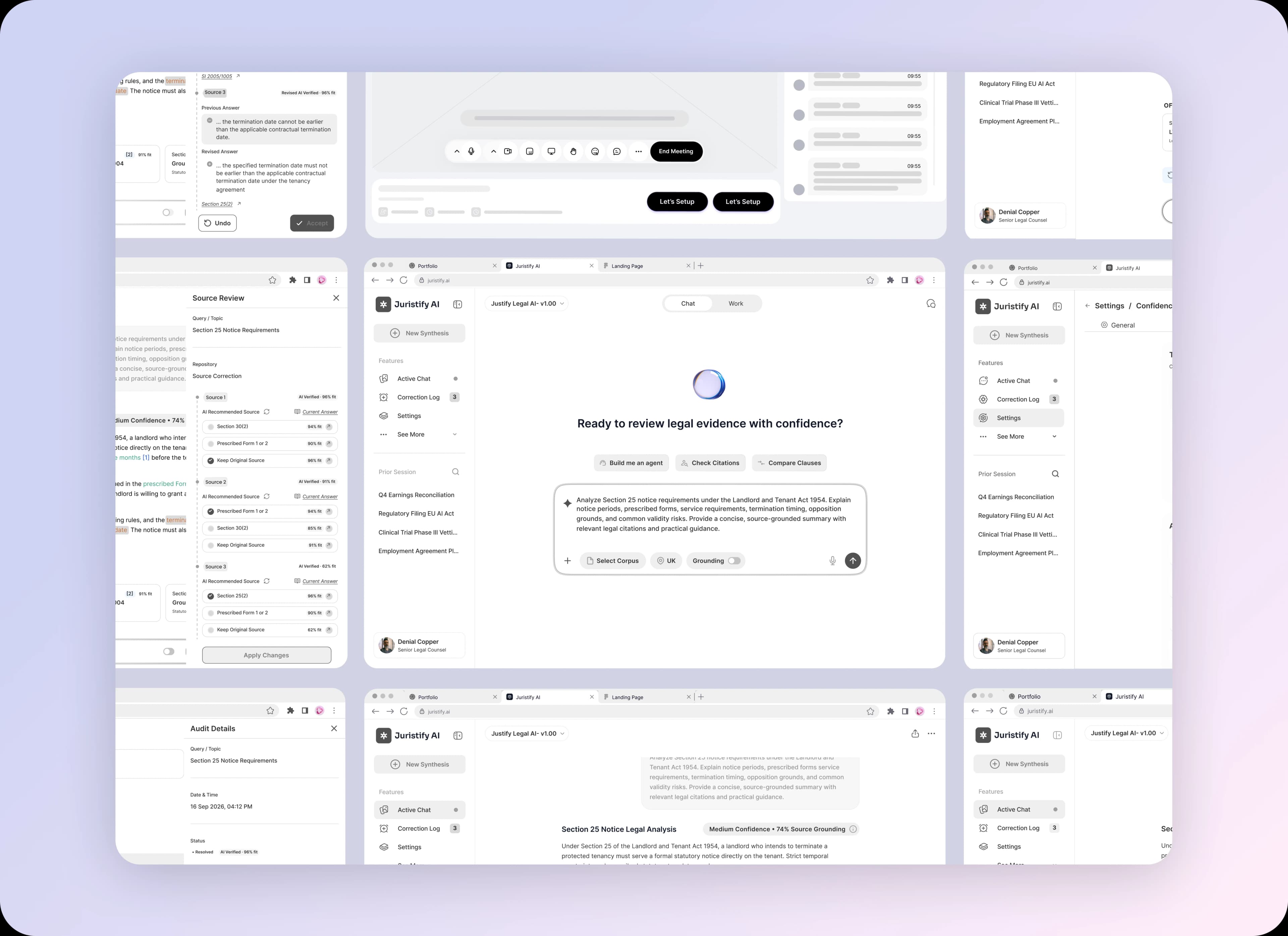
High-Fidelity Designs
Once the structure and design system were in place, we transformed the concepts into high-fidelity screens. Each screen was designed to make the AI experience clearer, more transparent, and easier to trust.
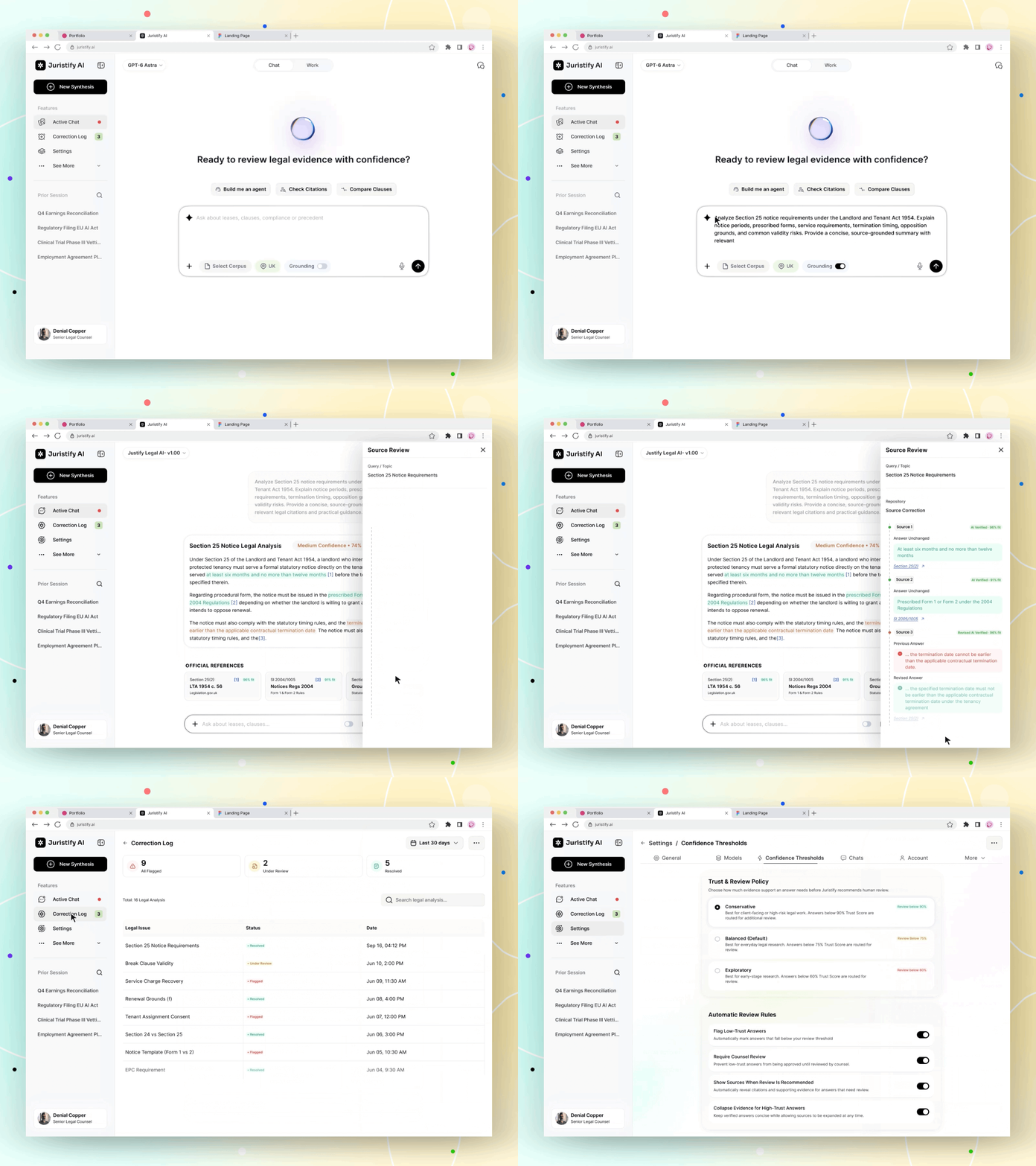
Consistent design make key trust features easy to recognize. Clear confidence cues, accessible source references, and visible correction options help users evaluate AI answers and make more informed decisions.
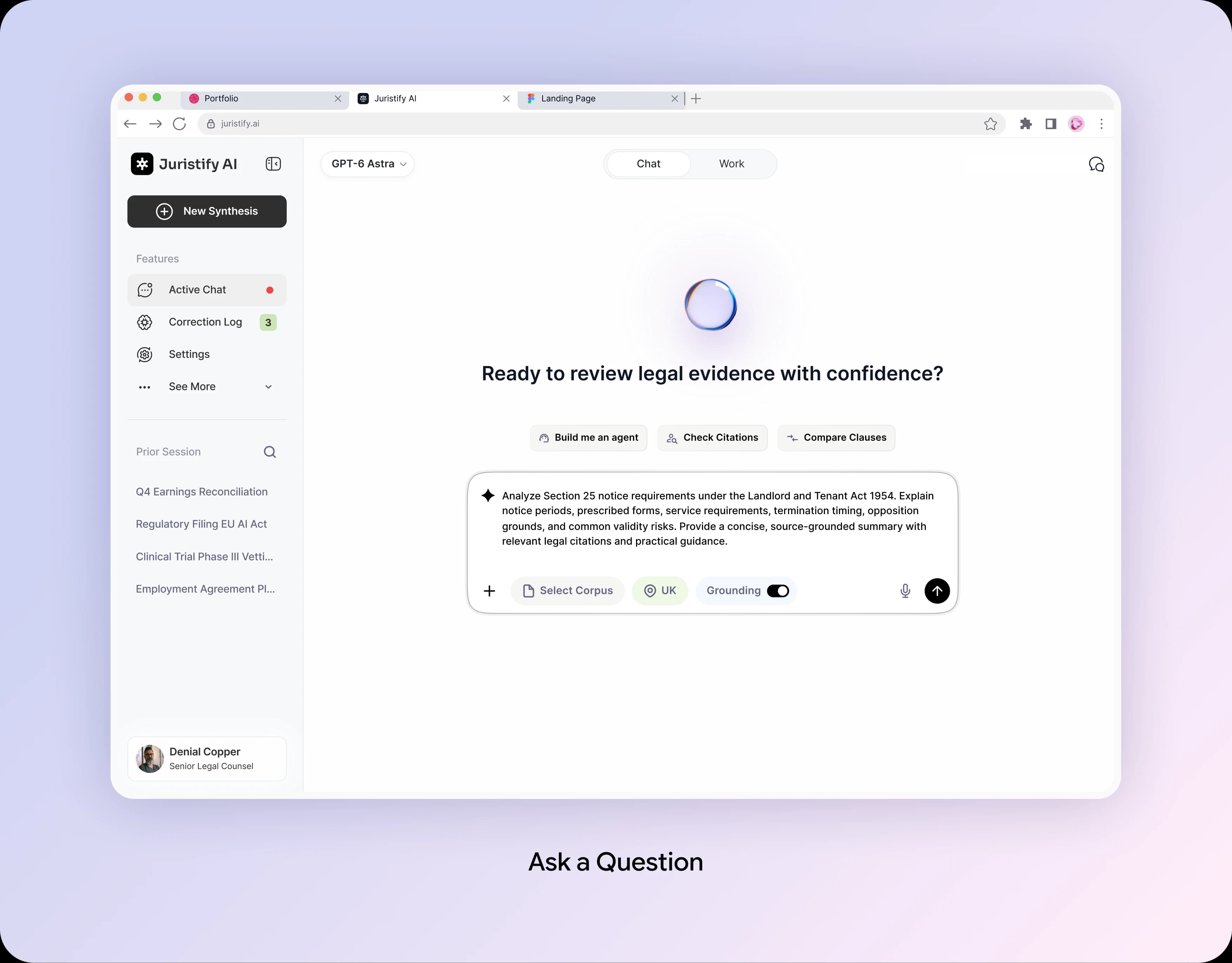
Ask Naturally: Make the First Step Effortless
A simple chat input field with quick-action buttons and built-in search filters (like location and source selection) that help users to write clear questions easily.
Design Decision:
Adding search filters directly inside the input box controls where the AI looks for answers, stopping fake information before it happens and keeping the screen easy to use.
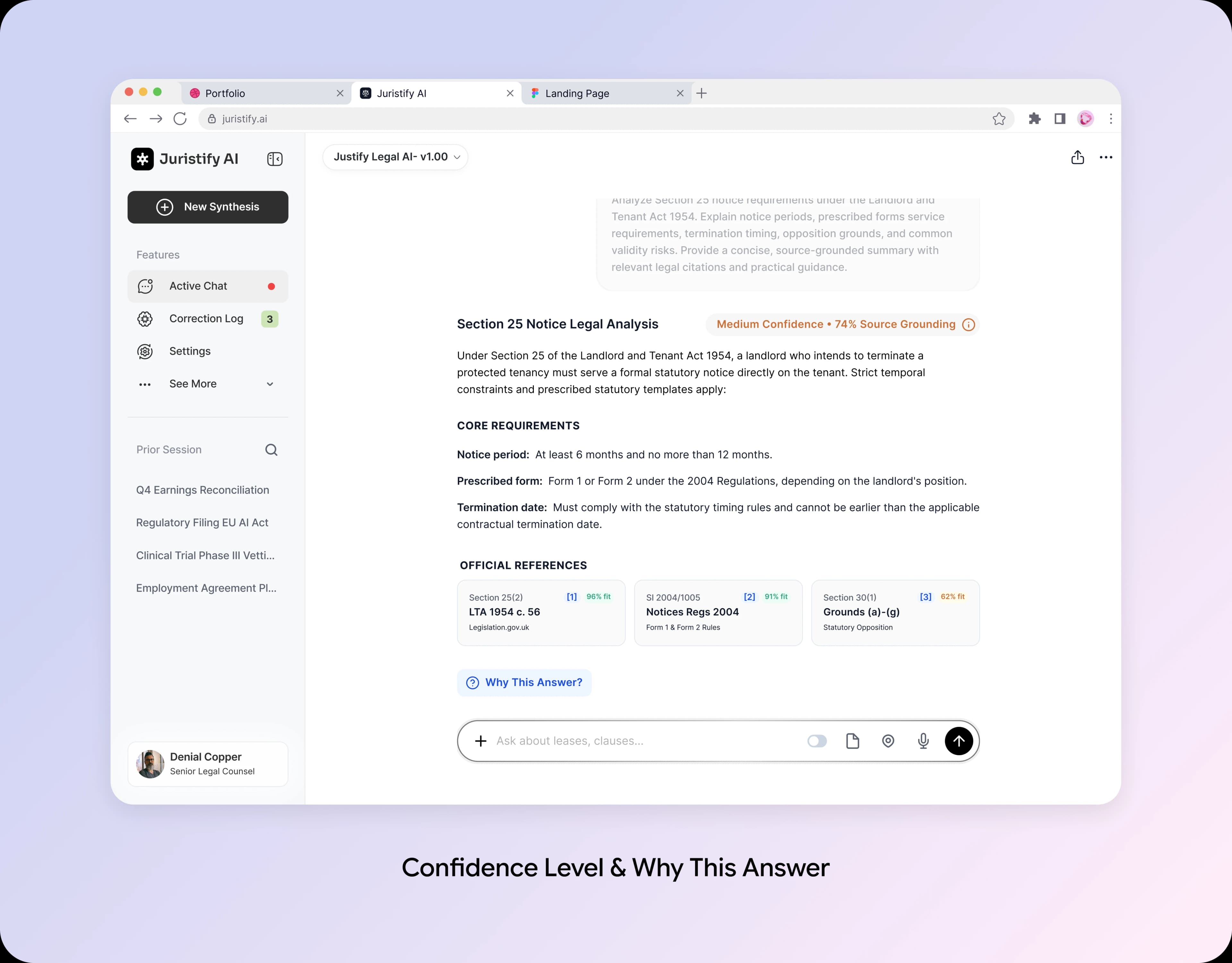
Confidence at a Glance: Make Uncertainty Visible
A simple status badge ("Medium Confidence • 74% Source Grounding") appears right at the top of the answer to show how reliable the response is.
Design Decision:
Showing the AI's confidence level upfront lets users instantly know if an answer can be trusted or needs extra fact-checking.

Why This Answer? Explore the Evidence Behind AI
Clear legal source cards with match scores (like 96% fit) and a prominent "Why This Answer?" button sit directly under the text.
Design Decision:
Adding clickable citations with match percentages lets users double-check the real sources in one tap without leaving their workflow.
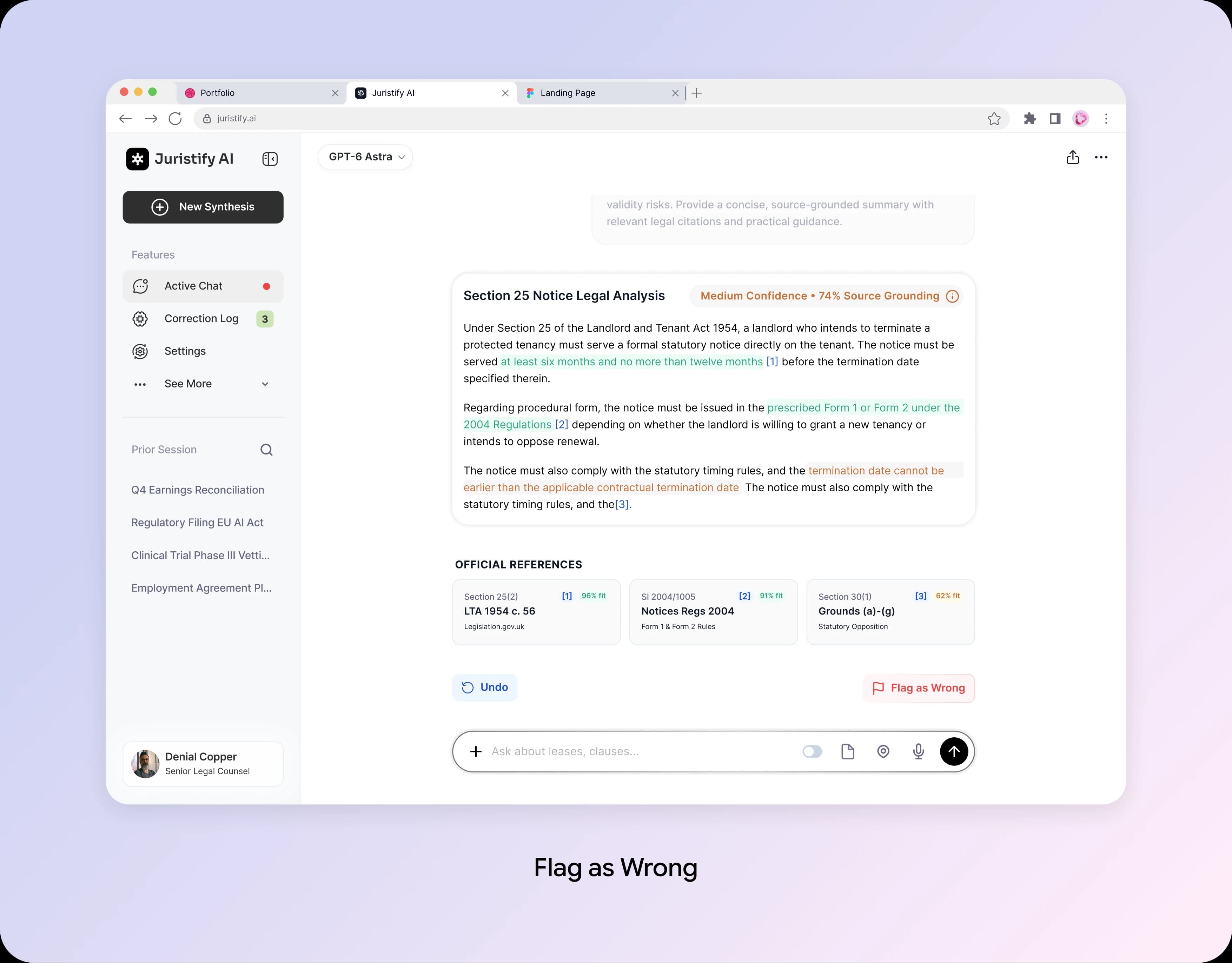
Flag as Wrong: Turn Frustration Into Feedback
A dedicated red "Flag as Wrong" button sits right below the answers alongside an "Undo" option, allowing users to report inaccuracies with a single click.
Design Decision:
Giving users a quick way to report wrong answers turns mistakes into useful feedback and updates the "Correction Log" automatically.
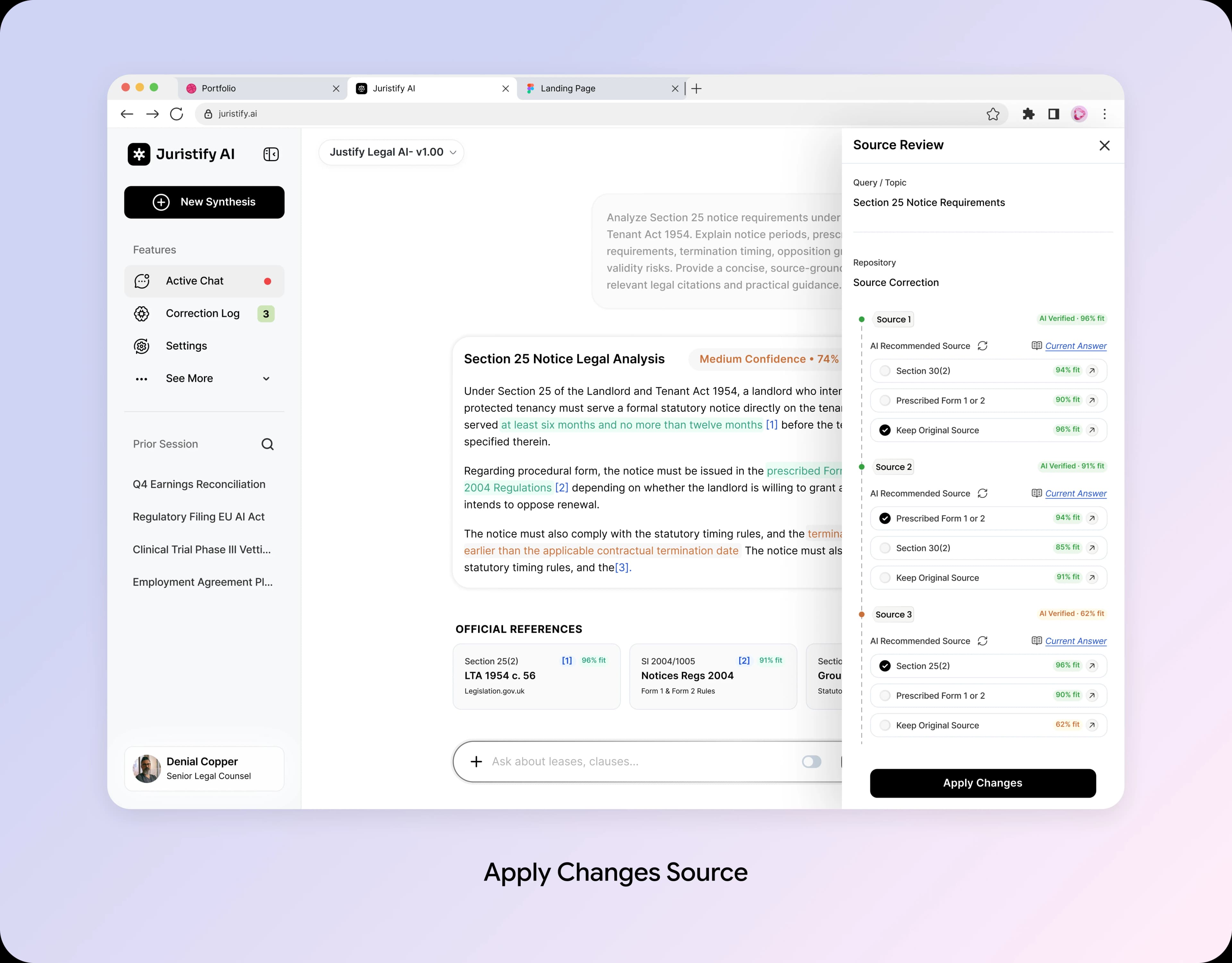
Source Review: Give Users the Final Say
A simple side panel opens to show all references with score percentages, letting users pick or change sources easily.
Design Decision:
Giving users control to override or pick sources ensures the final answer is human-checked and accurate.
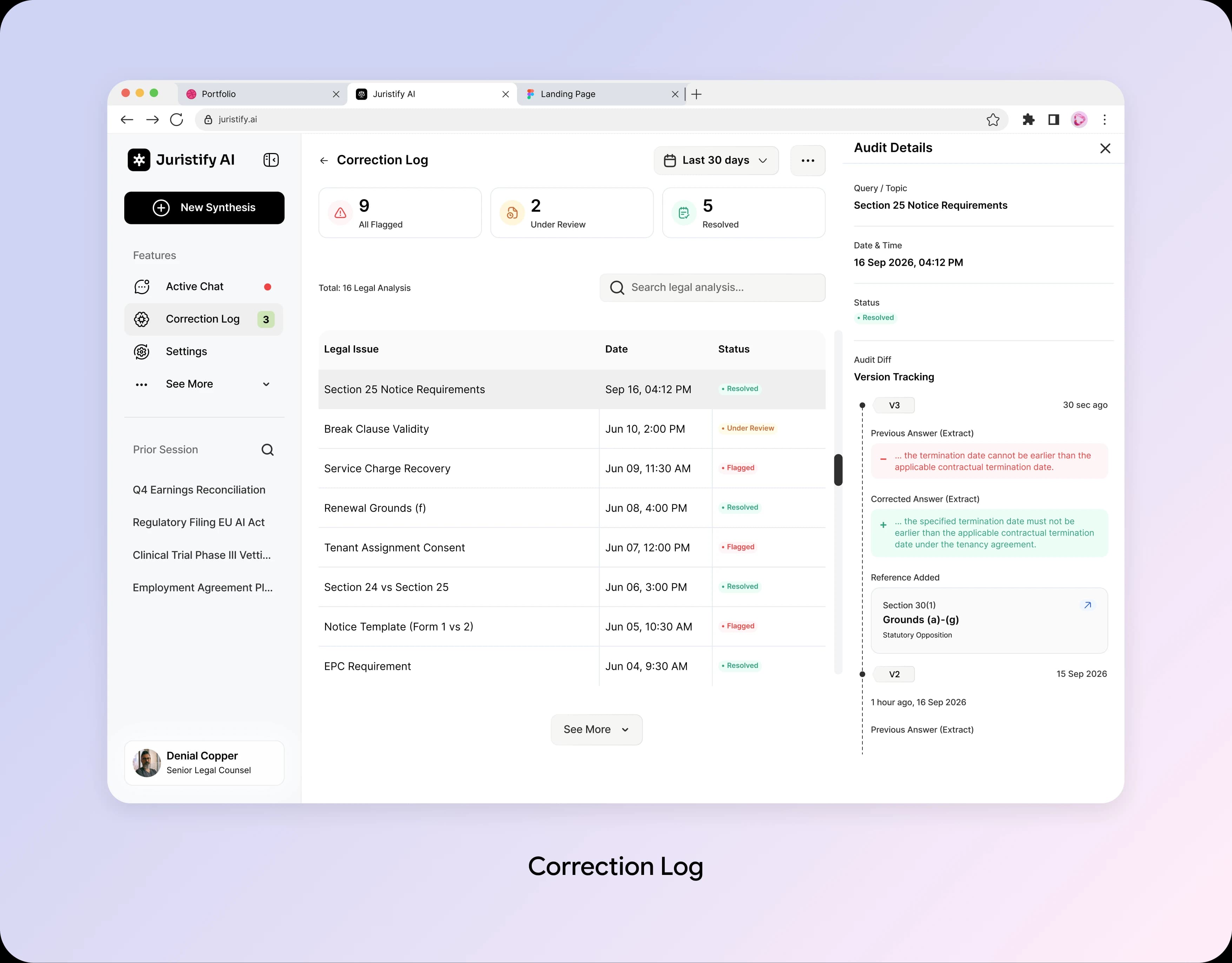
Correction Log: Make Feedback Outcomes Visible
A simple history page tracks all reported mistakes (Flagged, Under Review, Resolved) and shows a clear side-by-side view of original vs. corrected answers.
Design Decision:
Showing real-time status updates and version changes proves to users that their feedback actively fixes errors and improves the AI.
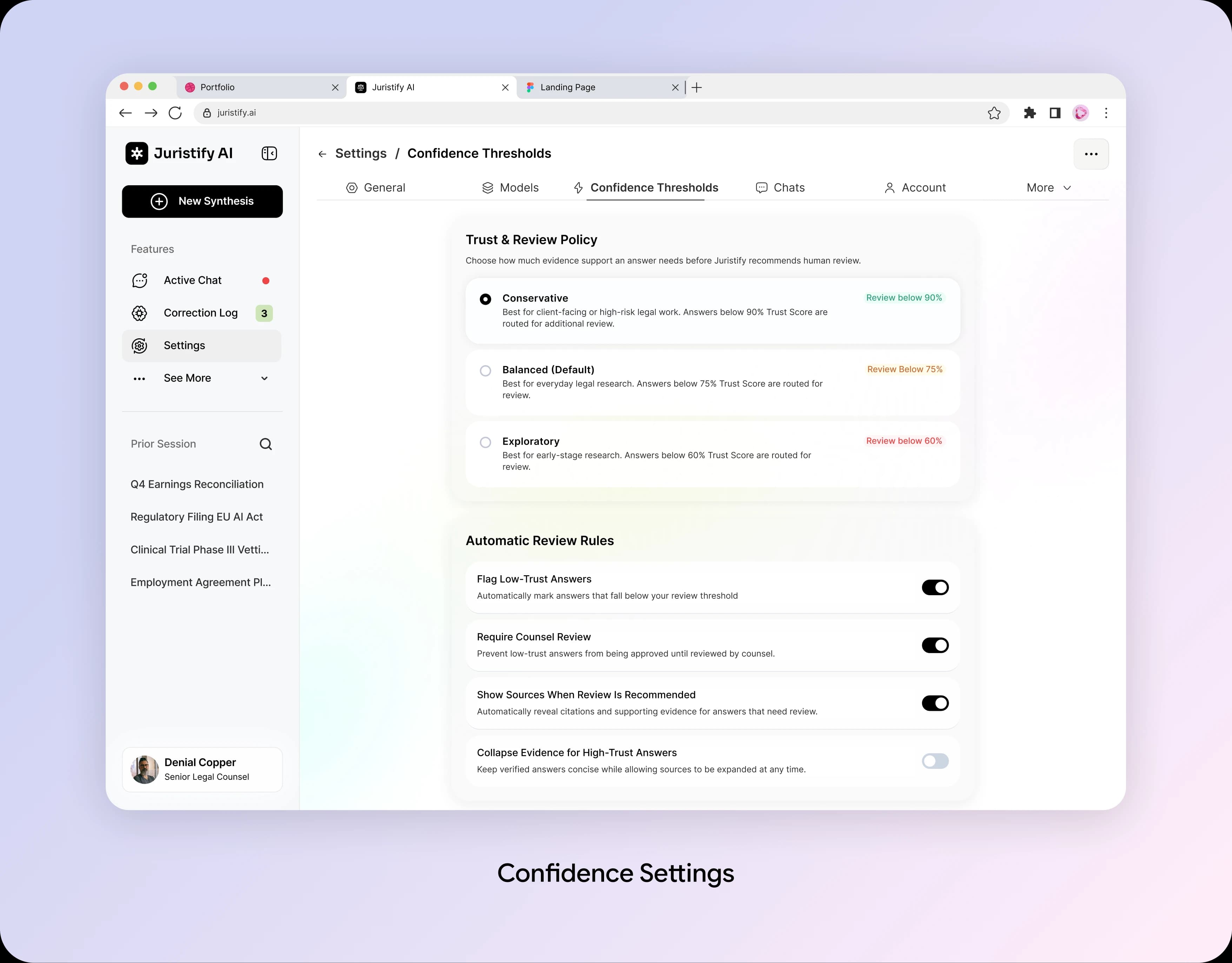
Confidence Settings: Control Over Transparency
A settings page with options like Conservative, Balanced, and Exploratory, along with simple toggle switches for automatic review rules.
Design Decision:
Giving users control over trust levels lets them set how strictly the AI checks answers based on their legal work's risk level.
The Product Outcome: Transparency Within the Conversation
The designed experience integrates confidence labels, source details, feedback, and correction history into AI conversation, helping users evaluate legal answers and verify supporting evidence.
These screens illustrate design decisions and intended user benefits. Post-launch improvements in trust and response completion have not yet been measured.
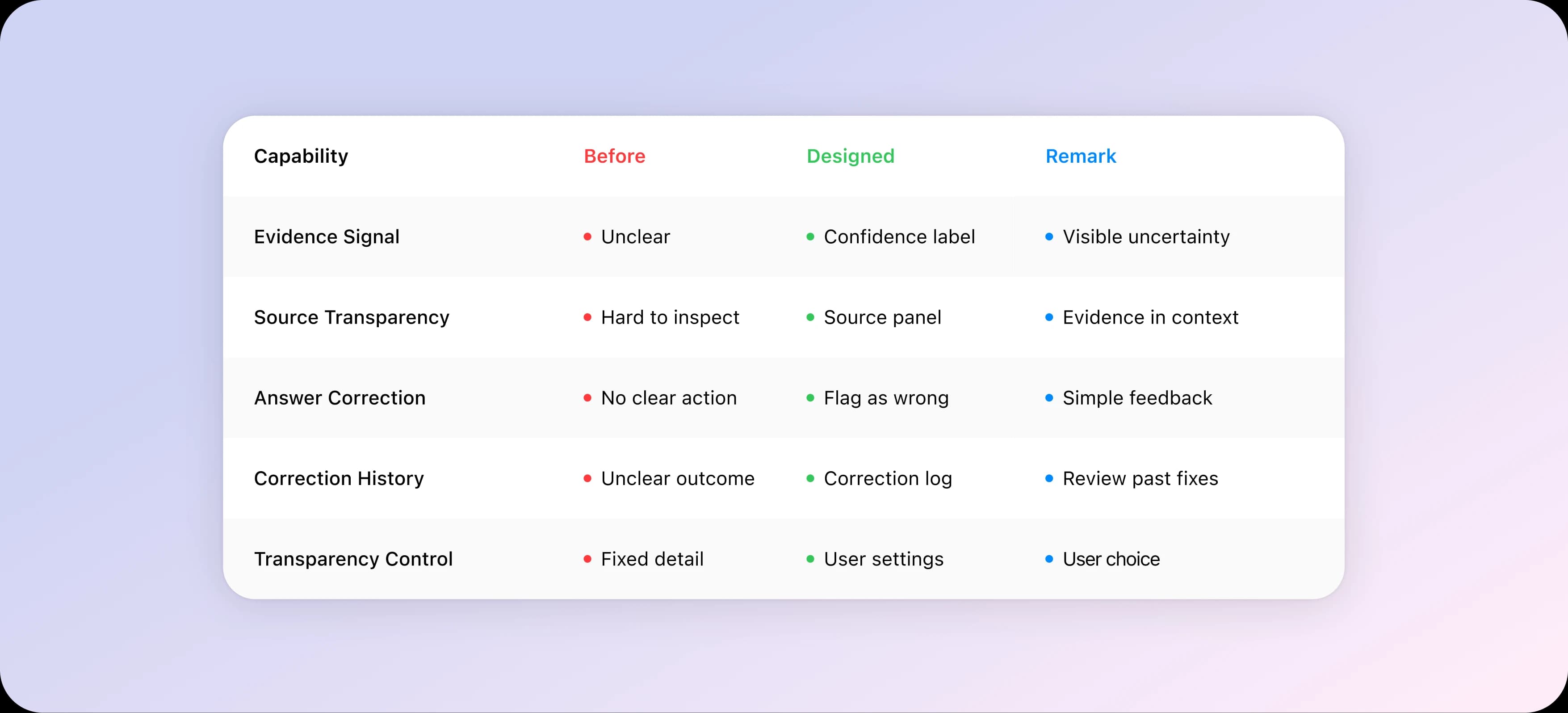
What This Design Enables

What We Would Build Next
The trust-focused redesign makes AI answers easier to understand, verify, and evaluate. Next, we would explore three opportunities to make Juristify AI a more transparent and dependable legal research experience.
V1: Real-World Simulations
Replace plain question and answer with role-based tasks. A designer critiques a UI. A product manager solves a prioritization exercise. Why: it measures real ability, not memory.
V2: AI Coaching After the AI Answer
Users get personal coaching on communication, structure and areas to improve. Why: growth keeps users engaged.
V3: Portable User Identity
Verified response results travel with the user across companies. One response can open many doors. Why: it reduces repeated verification.
What This Project Taught Us
Four lessons we will carry into every AI product design:
Make AI Useful, Not Just Intelligent
AI creates value when its intelligence translates into clear, relevant, and actionable user experiences.
Solve Friction at the Source
Improving the source trust showed us that trusted source can unlock the value of platform.
Design for Trust and Control
Giving users control over their workflow makes AI interactions feel more predictable, transparent, and reliable.
Turn Complexity into Confidence
Simplifying legal workflows and guiding users through each step made a complex AI-powered experience feel more approachable.
What we valued most about this project was transforming technically complex legal AI product into more intuitive, trustworthy and human-centered experience.
Special Note:
This case study is based on a real client engagement. Certain identifying details have been omitted due to confidentiality requirements.
Thanks For Reading
Explore More of Our Work

90% of Candidates Quit the AI Interview. Here's How We Fixed It.
View Details